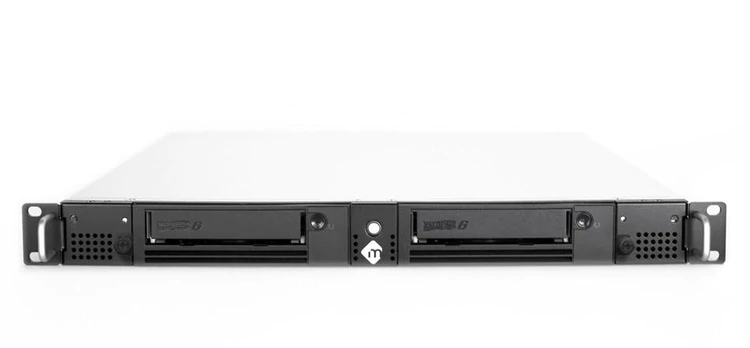
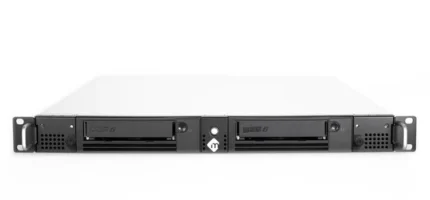
| Content | mRack LTO-6 Dual Tape drive
mRack LTO revolutionizes LTO, empowering users to easily connect LTO-6 technology to portable, desktop and all-in-one computers that feature Thunderbolt connectivity.
LTO tape offers a shelf-life of 30+ years and a reliability level that exceeds what is achievable with spinning disk and solid state drive technology. mRack is the ultimate archiving solution to safeguard important digital media for the long term. And LTO tape is not only more reliable than disk, but much more cost effective.
mRack LTO supports the Linear Tape File System (LTFS). With LTFS, mTape mounts just like a hard disk with drag and drop functionality.
-
- 1U rack mountable enclosure with single or dual LTO-6 tape drives
-
- Ideal for desktop use or for mounting in standard 19” racks or DIT carts
-
- 2.5 TB native storage capacity per tape cartridge
-
- LTO tape has a 30+ year shelf-life - Significantly longer than hard drives
-
- Up to 160 MB/second data transfer rate
-
- Reads and writes to both LTO 5 & 6 tapes
-
- Compatible with industry leading backup and archiving software
-
- Dual Thunderbolt 2 ports enables daisy-chaining of Thunderbolt peripherals
-
- Dual drive version enables writing to two LTO-6 drives simultaneously
-
- Ships complete with Fujifilm LT0-6 cartridges, Fujifilm Universal Cleaning Cartridge and Thunderbolt cable
Backup. Archive. Manage. Works with your favorite software.
mRack is compatible with industry leading LTO archiving and media management software for macOS and Windows including:
-
- Imagine Products - PreRoll Post
-
- StorageDNA - DNA Evolution
-
- XenData - XenData 6 Workstation
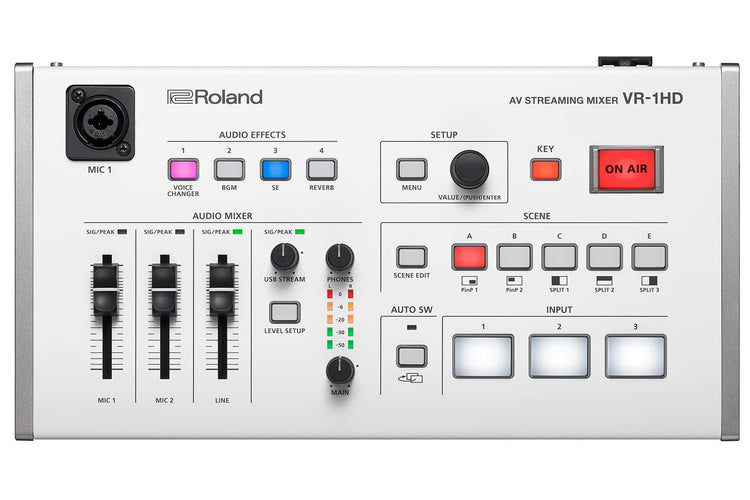
| If you’re a content creator seeking maximum engagement, livestreaming outperforms uploaded video by a significant margin; audiences are larger, watch for longer and post more comments. Roland’s VR-1HD lets you broadcast dynamic multi-camera livestreams, complete with amazing picture and sound that easily outshines ‘standard’ livestreams from a mobile phone or static webcam. Whether you’re a creator, gamer, commentator or presenter, it’s the easy way to livestream with high production standards. And since you’re going to get more comments, ensure they’re good ones with the VR-1HD.
Real engagement in real time
If you’re a content creator seeking maximum engagement, livestreaming outperforms uploaded video by a significant margin; audiences are larger, watch for longer and post more comments. Roland’s VR-1HD lets you broadcast dynamic multi-camera livestreams, complete with amazing picture and sound that easily outshines ‘standard’ livestreams from a mobile phone or static webcam. Whether you’re a creator, gamer, commentator or presenter, it’s the easy way to livestream with high production standards. And since you’re going to get more comments, ensure they’re good ones with the VR-1HD.
Your ‘plug and play’ broadcast studio
The VR-1HD has three “worry-free” HDMI inputs, and each one accepts a variety of HD and computer-based video resolutions. This lets you connect, switch and stream different sources including cameras, presentations, gameplay and even smartphones and tablets without having to think about it. The audio from these sources can be blended with the two studio-quality XLR microphone inputs and dedicated line input. Best of all, as the VR-1HD is designed for live broadcasting, its dedicated controls and top-mounted mic input (with gooseneck mic) let you go hands-free and headset-free while livestreaming.
Switch to superior livestreams
When preparing a video for uploading, your editing software can add some impressive layering options, including professional transitions that make ‘live-switched’ videos look boring by comparison. The VR-1HD has built-in Scene Switching to instantly jump between scenes that contain preset arrangements of layered sources, displayed within customizable inset windows.
Set-up the scenes in advance and recall them via the five scene preset buttons, to make your livestreaming way more interesting.
Video director inside
When you’re presenting a livestreamed vlog or nailing a live music performance, you’d normally need another person to help switch cameras. The VR-1HD lets you go it alone with three Auto Switching modes that take the strain once the broadcast begins;
Video Follows Audio
Video Follows Audio
The VR-1HD switches cameras based on who’s speaking into their microphone. If both people talk at once, or if no one is speaking, the VR-1HD can switch to a wide shot showing both presenters.
Beat Sync Switching
Start playing music and the VR-1HD will switch to different camera inputs based on your playing tempo or the music in your DJ performance – letting you act as your own VJ.
Auto Scan
For extended live streams with no operator, set the VR-1HD to switch between sources in a pre-defined order, or randomly, at your chosen rate of time.
Audio engineer inside too
Beat Sync Switching
Put audio on auto-pilot and relax, thanks to the VR-1HD’s Auto Mixing function. Just like having a sound engineer, you can ensure that different audio inputs aren’t competing, while also checking that the sound remains balanced. You can even set certain inputs to take priority so when the host starts to speak, the other audio levels are automatically reduced. Audio from your input sources can automatically change when you switch video sources, by engaging the Audio Follows Video function – one less thing to worry about during your livestream.
Sound like your best self or not yourself
Nobody talks about good sound when watching a live stream but they sure notice when its bad. Pros use sound “equalizers” to balance the highs and lows of the audio, “gates” to keep open mics quiet unless someone is speaking and “compressors” to balance out changes in volume when speaking or singing. These are all in the VR-1HD to make sure everyone sounds their best on air along with reverb if someone is inspired to sing and needs a little ambience.
Radically transform your voice
Radically transform your voice
Roland makes the legendary VT series of Voice Transformers, used by creators, gamers and singers to radically change their voice in real-time. This technology means that a male can sound like a female, a female can sound like a male, and anyone can sound like a robot, a monster or an alien. Derived from Roland’s VT series, the VR-1HD’s Voice Changer effect can be applied to the mic inputs, and each input even has its own Voice Changer settings, so people can sound like someone else — or something else — entirely.
Sounds and stingers on-demand
Some of the greatest radio and video personalities incorporate a signature soundtrack and sound effects, known as stingers, that become part of their brand and image. The VR-1HD lets you add your own custom sound effects via USB memory, including jingles or even a theme song, and trigger them instantly via the four Audio Effects buttons on the VR-1HD’s top panel.
Connect to your computer, connect to your audience
The VR-1HD uses the same connection technology as webcams, so just hook up to your computer via USB 3.0 and fire up the live casting or recording software. Then jump straight into a professionally produced, Full HD broadcast on your favorite platform, including Twitch, YouTube or Facebook Live.
RCS
The VR-1HD RCS software is designed to control the VR-1HD using a computer. By connecting the VR-1HD to your computer via USB, you will be able to copy settings (backup) or update the system software of the VR-1HD in addition to remote controlling the unit from your computer. | Pearl 2 Rackmount
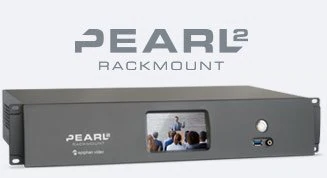
Pearl 2 Rackmount, the all-in-one system for live video switching, streaming and recording in HD and with an option for 4K.
- 2U rackmount chassis
- Live video switching using the touch screen or web UI
- Stream audio + 12G-SDI, HD-SDI, SD-SDI, HDMI™
- Up to 6 1080p HD streams at 30 fps or 2 at 60 fps
- Visual layout editor for simple creation of custom multi-view layouts
Pearl-2 Rackmount is a powerful 2U live production video mixer that fits perfectly into your 19-inch AV rack whether it’s threaded or unthreaded. Create stunning live video programs by by combining, encoding, switching and recording up to six video sources and 2 audio sources. With Pearl-2 Rackmount you can share any kind of video, anytime, anywhere, effortlessly.
Simple to use with a web-based portal for initial configuration, you get a drag and drop interface to create completely customizable layouts for your live stream. You can choose to keep Pearl-2’s default encoding settings or customize them to meet your exact needs. Control the video recorder and video switcher capabilities via the touch screen or the tablet-friendly Epiphan Live interface.
Start streaming live today with Pearl-2 Rackmount!
About Pearl-2 4K Add-ons
Pearl-2 Rackmount is sold as a base model and uses add-ons to activate extra features. With the base model, all six video inputs accept a maximum of input resolution of 1920×1080 and you can create up to six 1080p Full HD video programs at 30 fps.
The 4K feature add-on gives you 4K encoding and streaming capabilities. With this add-on activated you can create a 4K program comprised of up to 2 4K inputs and 2 HD or IP camera inputs.
Add-on details:
|
HD INPUTS |
4K INPUTS |
OUTPUT PORTS |
HARDWARE SCALING |
| Pearl2 Base |
6 × HD |
– |
2 × HDMI |
– |
| Pearl2 with 4K feature |
4 × 4K + 2 × HD |
✓ |
2 × HDMI 4K |
4K to 1080p |
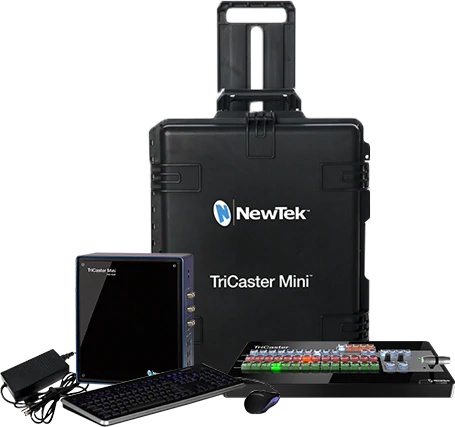
Pearl-2 feature add-ons can be purchased any time: either when you buy Pearl-2, or later. Once you purchase your add-on, Pearl-2 uses a one-time web activation to give you the new add-on functionality. | This complete bundle includes the newest TriCaster Mini SDI TCMASDIR2 with the TriCaster Mini Control Surface and custom designed hard travel case.
This is the newest version of the NewTek TriCaster Mini Advanced sdi with substantially upgraded components and features now closer in hardware to the TriCaster Mini 4K | NDI.
- The new TriCaster Mini SDI no longer comes with a side screen. Overall, NewTek was able to focus on better heat control, and optimized hardware for a performance and reliability gains.
- Now comes with Quad output nVidia Quadro based card for more powerful real time advanced processing including full use of CUDA for increased quality, hardware assisted encoding, decoding and streaming.
- 4 Mini DisplayPorts - One for user interface and three for multi-viewers that run in full screen production quality. Comes with 4 mini DisplayPort adapters.
- New Dual 1Gb Ethernet for increased IP connectivity, and load balancing of across multiple connections. Sharing and load balancing of bandwidth across multiple connections using NDI version 4 doubles the amount of NDI traffic providing more powerful media connectivity and expansion.
- Internal 1 TB SSD storage for faster boot and load times, increased recording capabilities and higher reliability in portable environments.
- New portable storage USB 3.1 and USB-C ports for more concurrent recording capability.
- New 180watts power supply that makes the hardware quieter during operation.
- Comes with Windows 10 for increased performance and fewer security concerns.
Real Video Production. No Experience Required.
You don’t have to be a video expert, own a studio, or know your way around a broadcast control room to deliver your message through video with network-quality results. With an all-in-one design, do-it-yourself setup, and hundreds of entry-level and advanced production capabilities, you can be on your way to captivating audiences from anywhere within minutes of opening the box.
- HD switching, streaming, and recording
- 8 external video inputs and 4 mix outputs
- Connect to compatible IP devices via NDI® - Connect to the most prolific IP-based workflow in the industry right out of the box. With native integration of NDI®, NewTek’s innovative Network Device Interface technology, TriCaster Mini Advanced is instantly compatible with products from hundreds of manufacturers and developers over the network.
- Streaming to Facebook Live, Twitch, and more
- Real-time social media publishing
- Multi-channel recording and internal storage
- Video playback without any additional hardware
- Built-in live titling and motion graphics
- Multi-channel audio mixing
- Maximize your investment now and for the future. With TriCaster Advanced Edition software now included, TriCaster Mini Advanced offers more than 100 additional video production capabilities compared to the original system platform—at no additional cost.
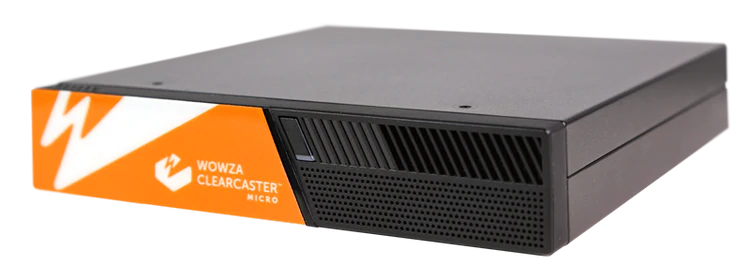
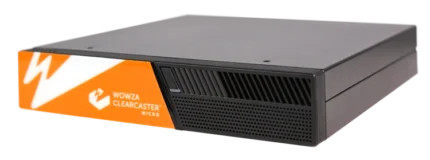
| The ClearCaster Micro is a portable live encoding solution packed with features. Ideal for live event producers in the field, the all-in-one Micro provides a reliable, cost-efficient way to stream broadcast-quality video to any destination.
Revolutionizing Cloud Control
The ClearCaster Micro is a portable live encoding solution packed with professional features. Ideal for live event producers in the field, the all-in-one Micro provides a reliable, efficient way to stream broadcast-quality video to any destination.
What is Wowza Cloud Orchestration?
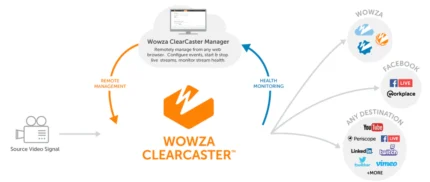
Cloud-based control of your entire encoding fleet — from anywhere in the world. Designed with a cloud-first approach and back-end management, Wowza Cloud Orchestration allows you to take complete control of your entire encoder fleet from anywhere in the world. Prebuilt using proven Wowza technology, Wowza Cloud Orchestration simplifies the most dicult parts of the encoding workflow — saving you time and lowering overhead costs. With Wowza Cloud Orchestration, you can easily manage thousands of streams with a scalable API, or build your own architecture on top of our cloud-optimized back-end infrastructure.
Key Features:
- Small and lightweight for on-the-go encoding
- Powerful mini-work station; perfect for challenging network conditions and locations
- Controlled by Wowza Cloud Orchestration API
- Supports Custom Wowza Linux environment
- Local and cloud recording and storage capabilities
- User Management
- Closed Captions
- Titling and Graphics
- Multi-Target/Output
- HEVC
- SRT
- Cloud Storage
- Made for Grab and Go
Cloud-Based ClearCaster Manager
Remote Manger: Browser-based control allows for remote management from anywhere.
Streamlined Workflows: Reliably take broadcasts live with just one click.
Multi-User Access: Provide your entire team with access to your encoders.
Health Monitoring: Identify issues quickly and ensure your broadcasts are ready to go live.
Custom Workflows: Build you own encoding workflows and use interface controls.
User Roles and Permissions: Restrict access on certain features to less technical team members.
Graphics Engine: Enable slates, count-down timers, lower-thirds and animated logos on your broadcast.
APIs: Use the GraphQL API to build your own applications utilizing ClearCaster.
Record Management: Immediately access clean recordings of your broadcasts in the cloud.
Ideal Cases Use:
- House of worship
- On-site events and news
- Education
- Government
- Entertainment
- Prosumers and more!
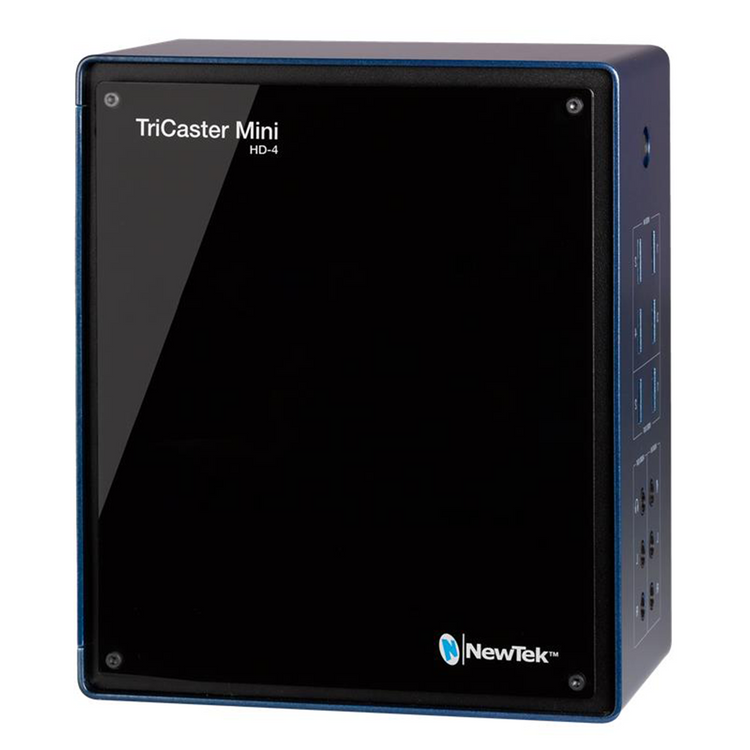
| The NewTek TriCaster Mini Advanced HD-4 is a compact, all-in-one multimedia solution that allows you to simultaneously broadcast, stream, and record live productions from virtually anywhere. The 16-channel switcher makes it easy to switch between four HDMI cameras, mix audio, add graphics and titles, and add advanced effects like virtual sets and animated transitions. Using the same intuitive and fully featured control software as the rest of the TriCaster professional line, the TriCaster Mini is suited for both new users and seasoned pros.
In addition to the four HDMI inputs, you can choose from two live sources from supported devices on the network, including computers, USB webcams, or even wireless Apple AirPlay devices. Two HDMI outputs are provided for sending the Program output with audio to external devices, with video-only HDMI and DVI outputs available for monitoring. In order to view the user interface and multi-view output, HDMI and DVI outputs are provided.
The TriCaster Mini features an internal 750GB storage drive that provides up to 15 hours of HD video recording. You can also attach external USB 3.0 drives to record up to four simultaneous video input or output signals at full resolution. The TriCaster Mini supports HD live streaming with presets up to 720p available for RTMP and browser-based streaming applications. Additionally, you can save a web-ready streaming file for later upload to popular social media or video-on-demand sites.
A cable retention bracket comes included, which doubles as a handle for the TriCaster Mini. Also included are a keyboard and mouse, which provide cordless operation via wireless Bluetooth technology. You can also add the optional TriCaster Mini Control Panel for traditional tactile control with T-bar and illuminated buttons.
All-in-One Multimedia Studio
The TriCaster Mini makes it possible for anyone to start creating multimedia content, without the need for additional software or equipment. With just one system, you can switch between four cameras, mix audio, add graphics and titles, and add advanced effects like virtual sets and animated transitions. You can also network with computers and wireless devices for presentations and screen sharing, stream to the web, publish to social media sites, and record content for later viewing.
Compact, Travel-Ready Size
The compact size of the TriCaster Mini allows you to produce and stream content from virtually anywhere. It’s small enough to fit into a backpack for easy travel, and doesn’t require a studio full of gear to use.
16-Channel, 4-Camera Production
Connect and switch between up to 4 HDMI cameras and produce content in resolutions up to 1080p. Two overlay channels allows for mixing sources and creating multi-layer compositions.
Network Sources
Choose two live sources from any number of supported devices on the same network. Supported sources include: networked computers via included NewTek iVGA client application; wireless Apple AirPlay devices; TriCaster 8000, 860, 460, 410 or Mini; 3Play 4800, 440 or 425; USB video sources; video over IP sources; RTMP or RTSP streams; HTTP streaming video sources; and a variety of third-party partner solutions.
Robotic Camera Support
Access up to 4 live Pan-Tilt-Zoom (PTZ) robotic cameras via standard serial and network protocols, with native preset system and user interface control over camera orientation, zoom, focus and iris.
Multi-Channel Audio Mixer
The multi-channel audio mixer within the TriCaster software lets you manage camera audio, including internal and external audio sources, outputs, recorded audio, stream audio, and headphone output. It supports Master and Aux output mixes.
- Pan control, solo auditioning, seven-band equalizer and stereo compressor/limiter per input and output, with per-input audio delay control
- Multi-bus routing of audio source channels to any combination of outputs, with independent level control over channels 1/2 and 3/4 for quad sources
- Audio Follow Video system enabling audio to follow multiple video sources, with support for unlimited audio grouping combinations
- Digital audio inputs equipped with audio time-base synchronizes
- Supports companion iPad audio mixing app and Avid Artist Mix audio control surface
Recording
Recorded media can be stored to the 750GB internal drive, accommodating approximately up to 15 hours of HD video recording. Media can also be recorded to external storage drives connected via USB 3.0. With using external drives, you can take advantage of the TriCaster Mini’s integrated ISO recording feature capabilities to record up to four simultaneous video input or output signals at full resolution in QuickTime, MPEG-2, AVI, or H.264 file formats.
Built-in Wi-Fi
Built-in Wi-Fi enables wireless connection to local network for streaming, publishing, and networking.
Streaming
TriCaster Mini supports HD live streaming with presets up to 720p, supporting the most common streaming profiles and custom multi-bitrate streaming profiles (including RTMP streaming and browser-based streaming applications), and auto-save of Web-ready stream file for video on demand (VOD) upload.
Publishing
Upload video and images directly to social media sites such as YouTube, Facebook, and Twitter, export content to FTP servers, and copy files to attached or networked storage locations.
Monitoring
An external monitor is required for viewing the user interface and for multi-view display. The TriCaster Mini has HDMI and DVI outputs for hooking up an external display.
Multimedia
Five digital media players are provided for video, graphics, and sounds. You can also access up to 15 additional graphic sources instantly during live production with still and title buffers.
Mix Effects
The TriCaster Mini features four M/E buses, each with independent switcher and key layer, for advanced video mixing, compositing, effects, and virtual sets.
Mix mode: Enables secondary switcher operation for output, submix or recording, with Program/Preview workflow and transitions
Effects mode: Enables multi-layer compositing, effects generation and virtual set application, with per-source 3D DVE, scaling, cropping and keying
Transistions and Effects
The built-in effects engine lets you apply transitions, animation stores, and real-time 3D video warping. An Animation Store Creator is included for creating custom effects.
Virtual Sets
Over thirty HD live virtual sets are provided with multiple camera angles, shot presets, realistic virtual camera movements, and real-time reflections, plus support for custom holographic virtual sets.
Note: In order to modify the included virtual sets, the separately available Virtual Set Editor v2.5 software license is required.
Macros
Use macros to record your favorite go-to-settings, commands, or operation sequences, and then create custom one-step shortcuts to simplify or automate control. Support for standard MIDI protocol enables third party MIDI device control of TriCaster operations via macros.
Grab Stills
Grab full resolution, de-fielded still images from Program output, and freely choose to add grabs to Publish queue, Media Player presets, and Buffer destinations. |




Reviews
There are no reviews yet.