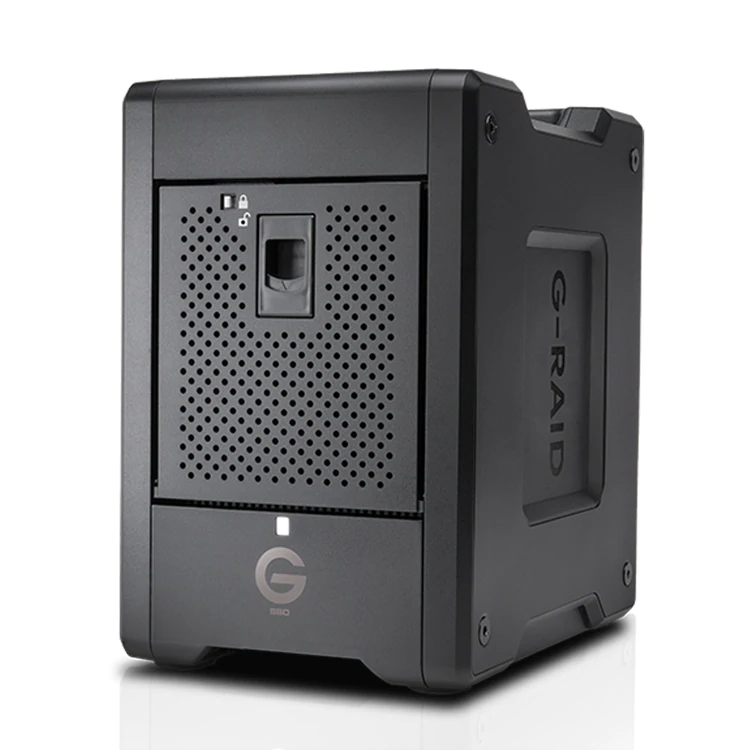
| Content | A scorching fast RAID powerhouse
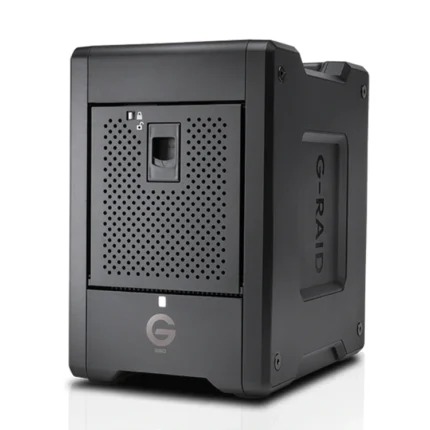
The G-RAID Shuttle SSD device with Thunderbolt™3 technology, a transportable design lets you edit multi-camera footage in real time and quickly export with incredible efficiency on location and back to the studio.
Ideal Capacity For Demanding Production Workflows
Up to 32TB1 of high-performance solid-state storage so you’re always able to transfer your critical 4K, 8K, VR, high dynamic range (HDR) and high frame rate (HFR) footage in a single location.
Transportable Design
Built for easy travel between your on-site production location and to the studio for post-production so you have powerful, transportable storage to help improve your workflow efficiency, wherever you are.
Sustained Transfer Rates Up To 2800MB/s
Transfer rates up to 2800MB/s2 deliver incredible speed via Thunderbolt 3 so you can natively edit footage in real-time, or transfer as much as a terabyte of content in seven minutes or less.
Optimized Support For Multi-Stream Workflows
Built for multi-stream 4K, 8K, and VR production workflows and offers the bandwidth to support multi-camera editing in real time, render footage with multi-layer effects, and quickly export in an efficient workflow.
Built-in Hardware RAID
For maximum performance, the G-RAID Shuttle SSD device comes in RAID 5 out of the box and supports RAID 0, 1, 5, 10 and 50 to provide a versatile and flexible storage solution.
Daisy-chaining for up to 5 additional devices
Dual Thunderbolt 3 ports allow you to daisy chain up to five additional devices so you can stay connected to multiple drives, 4K displays and more, through a single connection to your computer.
5-Year Limited Warranty
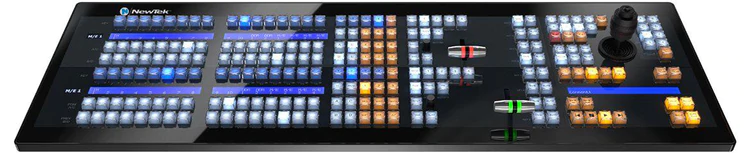
Backed by a 5-year limited warranty, you can be confident in the reliable storage of the G-RAID Shuttle SSD for years to come. | NewTek IP Series 2-Stripe Control Panel
Consummate control for IP production environments.
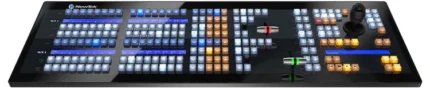
The perfect blend of power and versatility, the NewTek IP Series 2-Stripe Control Panel is built to handle interconnected productions—and environments—of any scale.
Surface ~ 35.7 x 11.96 x 5.0 in (90.7 x 30.4 x 12.7 cm)
Features
-
- Intuitive layout mapped to the NewTek IP Series Video Mix Engine user interface
-
- IP-based connectivity, with support for multi-engine control over the network
-
- Responsive, multi-bus operation with independently assignable control stripes
-
- Practical lighting, variable T-Bar illumination, and dynamic LCD label displays
-
- Precision controls for expert handling of real-time video operations
-
- Premium craftsmanship for optimal performance, ergonomics, and style
NewTek IP Series 2-Stripe Control Panel is also compatible with TriCaster TC1.
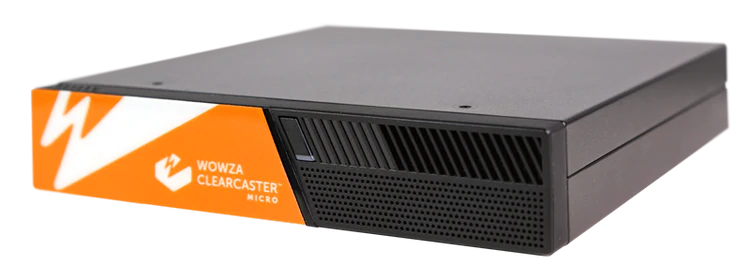
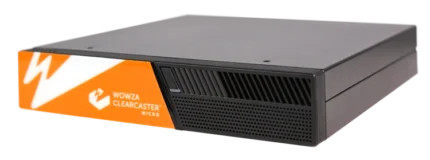
| The ClearCaster Micro is a portable live encoding solution packed with features. Ideal for live event producers in the field, the all-in-one Micro provides a reliable, cost-efficient way to stream broadcast-quality video to any destination.
Revolutionizing Cloud Control
The ClearCaster Micro is a portable live encoding solution packed with professional features. Ideal for live event producers in the field, the all-in-one Micro provides a reliable, efficient way to stream broadcast-quality video to any destination.
What is Wowza Cloud Orchestration?
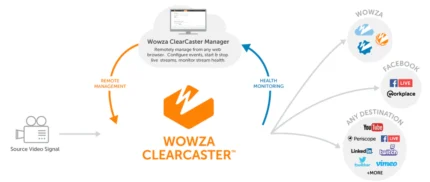
Cloud-based control of your entire encoding fleet — from anywhere in the world. Designed with a cloud-first approach and back-end management, Wowza Cloud Orchestration allows you to take complete control of your entire encoder fleet from anywhere in the world. Prebuilt using proven Wowza technology, Wowza Cloud Orchestration simplifies the most dicult parts of the encoding workflow — saving you time and lowering overhead costs. With Wowza Cloud Orchestration, you can easily manage thousands of streams with a scalable API, or build your own architecture on top of our cloud-optimized back-end infrastructure.
Key Features:
- Small and lightweight for on-the-go encoding
- Powerful mini-work station; perfect for challenging network conditions and locations
- Controlled by Wowza Cloud Orchestration API
- Supports Custom Wowza Linux environment
- Local and cloud recording and storage capabilities
- User Management
- Closed Captions
- Titling and Graphics
- Multi-Target/Output
- HEVC
- SRT
- Cloud Storage
- Made for Grab and Go
Cloud-Based ClearCaster Manager
Remote Manger: Browser-based control allows for remote management from anywhere.
Streamlined Workflows: Reliably take broadcasts live with just one click.
Multi-User Access: Provide your entire team with access to your encoders.
Health Monitoring: Identify issues quickly and ensure your broadcasts are ready to go live.
Custom Workflows: Build you own encoding workflows and use interface controls.
User Roles and Permissions: Restrict access on certain features to less technical team members.
Graphics Engine: Enable slates, count-down timers, lower-thirds and animated logos on your broadcast.
APIs: Use the GraphQL API to build your own applications utilizing ClearCaster.
Record Management: Immediately access clean recordings of your broadcasts in the cloud.
Ideal Cases Use:
- House of worship
- On-site events and news
- Education
- Government
- Entertainment
- Prosumers and more!
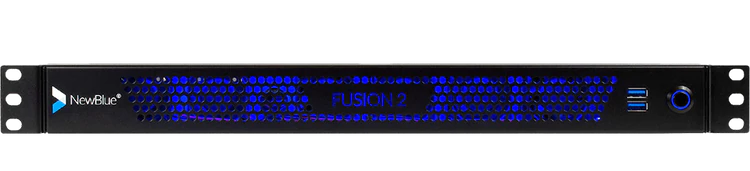
| Your turnkey broadcast graphics system.
Fusion 2 combines processing power with Titler Live Broadcast for an affordable, end-to-end graphics solution.
Press power and go.
Fusion 2 delivers your on-air graphics combining hardware and software in one dynamic device. Power your broadcast with a sophisticated combination of ultra portable hardware and Titler Live Broadcast software designed for broadcasters and a variety of enterprise markets. Go from unbox to broadcast in the same day.
Get up and running in three easy steps.
Experience end-to-end graphics in a short-depth 1U rackmount chassis running Windows 10.
Design.
Create graphics using the Title Designer. Import your After Effects projects, Photoshop files, or choose from our prebuilt templates.
Connect.
Integrate multiple input and output sources for ultimate control. Fusion 2's flexibility makes each live setup work for you.
Go live.
With minimal prep work and just a few clicks, press power and go live. Let Fusion 2 and Titler Live Broadcast do the rest for you.
Fusion 2 features Titler Live 4 Broadcast.
Now you can deliver unlimited layers of live animated graphics for all your broadcasting needs with Titler Live 4 Broadcast—directly in Fusion 2. Titler Live 4 Broadcast allows you to integrate your data in real-time and create high quality graphics on-the-fly.
Amp up your production value with a proven powerhouse.
Whether you want full customization or turnkey graphics on the fly, Titler Live 4 Broadcast ($2,999 value) brings high production value to your broadcast in minutes. We've loaded it with everything you need to look good, fast.
Customize hundreds of designs with the Title Designer.
With Fusion 2 preloaded with Titler Live 4 Broadcast, you can create custom motion graphics easily using its built-in Title Designer. Titler Live 4 Broadcast comes loaded with a full motion editor, hundreds of built-in templates, and can even import your existing graphics and Adobe assets. You can quickly grow your library of designs with our ever-expanding collection of Title Design Template collections.
Display your spreadsheet data in real-time.
Import your data from Excel spreadsheets and tables, XML files, CSV files, text files, and more. Using Titler Live 4 Broadcast, you can host all your data in a single file, display data rich infographics such as leaderboards and create instant lower thirds.
Access social media controllers and custom social templates.
Engage your audience with live comments, tweets, and Facebook reaction polling and queue them all in a custom social playlist. Remotely bring in comments curated from any machine in your local network. Titler Live 4 Broadcast also includes custom-designed social media graphics for a professional look in minutes.
Incorporate scoreboards and statistics.
Drive scoreboard data with realtime reading of JSON and XML files. Bring in scoreboard data from Daktronics, Stat Crew, or Sportzcast. You can also control your scoreboard directly from Titler Live's interface.
Simplify updates and changes in an instant.
Titler Live 4 Broadcast simplifies the traditionally labor-intensive process of creating motion graphics. Now, you can make last minute design or spelling changes, major or minor, with a few keystrokes. Ditch long rendering times and locked up content. With Titler Live 4 Broadcast, you can edit faster with extreme flexibility.
Fusion 2 Extreme
Get the top-of-the-line extreme version of Fusion with priority support and an additional 20 hours of professional service blocks.
- Everything included in Fusion 2 SDI.
- 20 hours of professional services including technical, creative or workflow consultation and engineering.
- Two year manufacturer's warranty.
- Blackmagic DeckLink 8K Pro for high resolution 8K workflows.
- Faster processor (AMD Ryzen 5 PRO 4650G 3.7 GHz).
- More memory (32 GB RAM).
Big or small—every studio needs Fusion 2.
Works in your existing broadcast architecture.
Seamlessly connect to your current broadcast ecosystem with a short-depth, 1U rackmount chassis perfect for shelf mounting in tight spaces such as broadcast trucks, mobile racks and fly away kits.
Drives your graphics with versatility.
Bring your production up to speed into the digital era with the multiple channels and bandwidth you'll need.
Includes onboarding with tailored training & support.
Experience full technical support, custom product onboarding and training to power up and go live.
Control
- Real-time playout
- Live animated updates per layer
- Automated sequencing & looping
- Spreadsheet and crawl autoplay mode
- Hotkey functionality
- Data search & select tool
- TriCaster macro control
- Remote operation on your network
- Network tally support
Outputs
- 16 channels of 4K-NDI
- Dual-channel HD-SDI key/fill (Blackmagic and AJA)
- Unlimited graphics per channel
- Unlimited graphics per playlist
- PNG sequence support
- HDMI
- OBS
- Watch Folder
- NewTek Airsend
- Normal-map-textured materials
- Depth-of-field control
- Blending modes
- Additive blend mode
- Object locking
Inputs
- Excel spreadsheets
- Spreadsheet table support
- XML files
- Stat Crew statistics - football
- Stat Crew® scoreboards
- Daktronics® scoreboards
- Sportzcast scoreboards
- Facebook Live comments
- Facebook Live comment polling
- Facebook Live reaction polling
- Twitter tweets
- YouTube Live chats
- GameWisp
- Stream Labels
- Streamlabs
- Tiltify
- Twitch
- Text files
- RSS feeds
- CSV spreadsheets
Design
- 3D animated graphics
- Animations, effects & transitions
- Native 4K resolution (NDI & SDI only) (Native 8K resolution for Extreme only)
- Adobe® After Effects® import
- Adobe® Photoshop® import
- Title Designer interface
- Sports & scoreboard packages
- Social media & polling packages
- Tables
- Lower thirds
- Crawls
- Main titles
- Motion bugs
Operating System
- Microsoft Windows 10 Pro 64-bit
Graphics Software
Hardware
- Processor - 6-Core AMD Ryzen™ 5
- Memory - 32GB DDR4 3200 MHz RAM
- Graphics - AMD Radeon™ 1900MHz, 7 graphics cores
- Storage - 500GB M.2NVMe SSD
- Video I/O - 2 4K-SDI Key/Fill Pairs
- Blackmagic DeckLink 8K Pro
Front Ports
Rear Ports
- 5 SDI Connectors - 4 video, 1 genlock (supports 2 key & fill pairs)
- 1 RJ-45 Network
- 4 USB 3.2 Gen 1
- 2 USB 2.0
- 2 HDMI
- 1 Display Port
- 3 Audio Jacks (Line In, Line Out, Mic In)
- 2 SMA WiFi Antenna Connectors
- BIOS flash button
- Power Supply - 300Watt max
Dimensions
- 1.75″ H x 16.77″ W x 10.5″ D
(1U rack height)
| PLUG-AND-PLAY FOR FLAWLESS RECORDINGS AND LIVESTREAMS
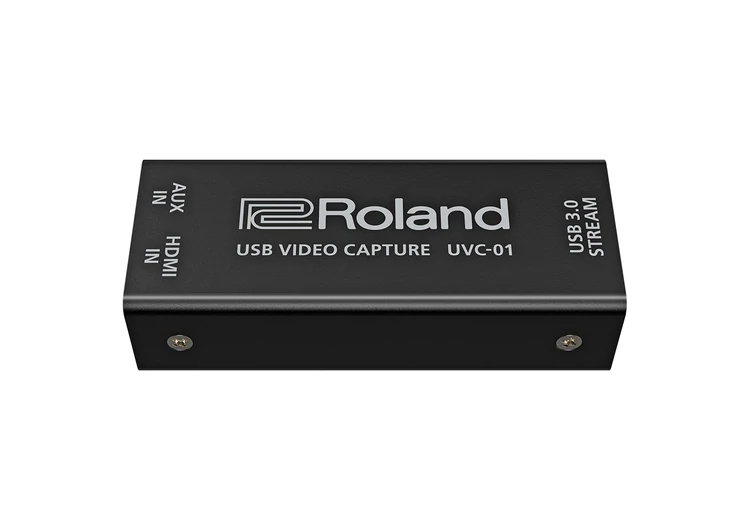
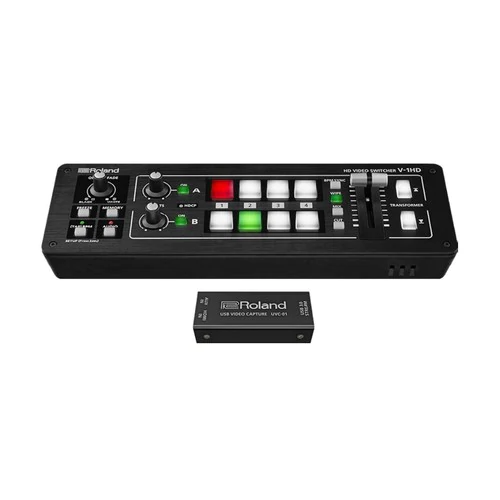
For online content creators, musicians, and gamers to businesses, schools, and houses of worship, livestreaming is an essential medium for communicating with people around the world. With the UVC-01, it’s never been easier to add high-quality livestreaming capabilities to your Roland V-series video switcher or favorite HDMI-equipped camera or camcorder.
Just connect to the UVC-01 via HDMI, plug into your computer’s USB 3.0 port, and start streaming to Facebook Live, YouTube, and other popular platforms. Offering plug-and-play operation in a rugged, pocket-size design, the UVC-01 is ready for action everywhere you go.
Features
- High-quality HDMI to USB 3.0 video encoder
- Plug-and-play USB webcam operation for Mac and Windows computers
- Seamlessly works with all Roland V-series switchers with an HDMI output
- Also works with most HDMI-equipped cameras and camcorders
- Uncompressed 1080p HD at 60 FPS for engaging livestreams
- Dedicated analog audio line input for live music versatility
- Powered via USB
Quality You Can Count On
Backed by more than two decades of professional A/V product development, Roland’s UVC-01 drives your livestream with uncompressed 1080p HD image quality, ultra-smooth 60 FPS motion, and low-latency encoding. And thanks to its hardware-based design, it just works every time you need it—efficiently, consistently, and reliably.
Plug In and Stream
Once connected, the UVC-01 automatically shows up as a source in your streaming software, with no drivers or fussy setup required. Like a dedicated webcam, it encodes HDMI to USB video class and USB audio class formats, letting you instantly stream at superspeed USB 3.0 with any service, platform, or application that accepts a webcam as its A/V source.
A Sound Solution
With the UVC-01, stereo audio is embedded in the HDMI feed along with video. And thanks to the dedicated audio input, it’s possible to blend a secondary sound source as well. For example, you can play bumper music from your smartphone, or use Roland’s GO-MIXER Pro to combine a mic and instruments for impactful musical performances.
Reach More People
By delivering your message to in-person and online audiences at the same time, you can achieve a wider reach with minimal extra effort. Using a Roland professional video switcher in tandem with a UVC-01, it’s simple to create these hybrid productions. Just connect the UVC-01 to the second output of your switcher and simultaneously broadcast live action to your preferred streaming platform.
Capture and Distribute
In some situations, you may want to record a presentation ahead of time and distribute it online after the fact. With the free Roland Live Recorder (Windows) and Video Capture for VR (Mac) applications, you can capture high-quality video and audio through the UVC-01 in real time, ready for upload to video sharing sites.
VIDEO
- Input Connectors: HDMI IN connector: HDMI type A
* Multi-format Supported
* HDCP Not Supported
- Output Connectors: USB STREAM port: USB 3.0 B type
- Input Formats: 480/59.94i, 576/50i, 480/59.94p, 576/50p, 720/59.94p, 720/50p, 1080/59.94i, 1080/50i, 1080/59.94p, 1080/50p, VGA (640 x 480/60 Hz), SVGA (800 x 600/60 Hz), XGA (1024 x 768/60 Hz), HD (1280 x 720/60 Hz), WXGA (1280 x 800/60 Hz), SXGA (1280 x 1024/60 Hz), FWXGA (1366 x 768/60 Hz), SXGA+ (1400 x 1050/60 Hz), UXGA (1600 x 1200/60 Hz), FHD (1920 x 1080/60 Hz)
* The refresh rate is the maximum value of each resolution.
* Conforms to VESA DMT Version 1.0 Revision 11.
- USB Video Output Format: YUY2 (Uncompressed)
- USB Video Output Resolution: 1920 x 1200, 1920 x 1080, 1680 x 1050, 1600 x 1200, 1600 x 900, 1440 x 900, 1366 x 768, 1360 x 768, 1280 x 1024, 1280 x 960, 1280 x 800, 1280 x 720, 1152 x 864, 1024 x 768, 1024 x 576, 960 x 540, 856 x 480, 800 x 600, 768 x 576, 720 x 576, 720 x 480, 640 x 480, 640 x 360, 320 x 240
* The maximum frame rate is 60 fps.
AUDIO
- Audio formats: HDMI IN connector: Linear PCM, 48 kHz / 44.1 kHz, 24 bits / 20 bits / 16 bits, stereo
- USB STREAM port: Linear PCM, 48 kHz, 16 bits, stereo
- Input Connectors: HDMI IN connector: HDMI type A
- AUX IN jack: Stereo miniature phone type
- Output Connectors: USB STREAM port: USB 3.0 B type
- Nominal Input Level: AUX IN jack: -10 dBu (Maximum input level: +8 dBu)
- Input Impedance: AUX IN jack: 10 k ohms
OTHERS
- Power Supply: Supplied from the computer via USB
- Current Draw: 500 mA
- Operation Temperature: +0 to +40 degrees Celsius
- +32 to +104 degrees Fahrenheit
- Dimensions: 90 (W) x 37 (D) x 23 (H) mm
- 3-9/16 (W) x 1-1/2 (D) x 15/16 (H) inches
- Weight (excluding AC adaptor):96 g
4oz
VIDEO
- Input Connectors: HDMI IN connector: HDMI type A
* Multi-format Supported
* HDCP Not Supported
- Output Connectors: USB STREAM port: USB 3.0 B type
- Input Formats: 480/59.94i, 576/50i, 480/59.94p, 576/50p, 720/59.94p, 720/50p, 1080/59.94i, 1080/50i, 1080/59.94p, 1080/50p, VGA (640 x 480/60 Hz), SVGA (800 x 600/60 Hz), XGA (1024 x 768/60 Hz), HD (1280 x 720/60 Hz), WXGA (1280 x 800/60 Hz), SXGA (1280 x 1024/60 Hz), FWXGA (1366 x 768/60 Hz), SXGA+ (1400 x 1050/60 Hz), UXGA (1600 x 1200/60 Hz), FHD (1920 x 1080/60 Hz)
* The refresh rate is the maximum value of each resolution.
* Conforms to VESA DMT Version 1.0 Revision 11.
- USB Video Output Format: YUY2 (Uncompressed)
- USB Video Output Resolution: 1920 x 1200, 1920 x 1080, 1680 x 1050, 1600 x 1200, 1600 x 900, 1440 x 900, 1366 x 768, 1360 x 768, 1280 x 1024, 1280 x 960, 1280 x 800, 1280 x 720, 1152 x 864, 1024 x 768, 1024 x 576, 960 x 540, 856 x 480, 800 x 600, 768 x 576, 720 x 576, 720 x 480, 640 x 480, 640 x 360, 320 x 240
* The maximum frame rate is 60 fps.
AUDIO
- Audio formats: HDMI IN connector: Linear PCM, 48 kHz / 44.1 kHz, 24 bits / 20 bits / 16 bits, stereo
- USB STREAM port: Linear PCM, 48 kHz, 16 bits, stereo
- Input Connectors: HDMI IN connector: HDMI type A
- AUX IN jack: Stereo miniature phone type
- Output Connectors: USB STREAM port: USB 3.0 B type
- Nominal Input Level: AUX IN jack: -10 dBu (Maximum input level: +8 dBu)
- Input Impedance: AUX IN jack: 10 k ohms
OTHERS
- Power Supply: Supplied from the computer via USB
- Current Draw: 500 mA
- Operation Temperature: +0 to +40 degrees Celsius
- +32 to +104 degrees Fahrenheit
- Dimensions: 90 (W) x 37 (D) x 23 (H) mm
- 3-9/16 (W) x 1-1/2 (D) x 15/16 (H) inches
- Weight (excluding AC adaptor):96 g
4oz
| So compact and portable, you can bring the V-1HD and use it anywhere!
The V-1HD is a compact and portable four channel video switcher with both hardware and connected PC / iPad control that supports four HDMI inputs at resolutions of up to 1080p along with a 12 channel audio mixer with audio embedding and de-embedding from HDMI. The V-1HD supports professional compositing effects such as picture-in-picture and keying allowing for graphic insets, titling or even “green screen” and is ideal for news broadcast or corporate training productions. For creative live event video switching, the V-1HD includes a advanced video effects for transforming video into creative visuals to support all kinds of performances.
Features:
- Support for video cameras, action cameras, smart phones, tablet computers and other HDMI devices
- 4 HDMI inputs
- Supports up to Full HD 1080p
- Easy to Use Interface
- Picture-in-picture and split functions
- Two EFFECTS knobs deliver genuine visual performance
- Full 12 Channel Audio Mixer Included
- Easy to Operate with Hardware Controls
- Two HDMI Outputs
- Remote Control via USB or MIDI Connection
Feature packed and easy to use for high-quality HD video results.
For creative live event video switching, the V-1HD includes a advanced video effects for transforming video into creative visuals to support all kinds of performances. Output of your video mix is as simple as connecting the HDMI output to a projector or screen at an event and you can even connect a recorder for capturing your event or production.
4 HDMI Inputs
The V-1HD has 4 HDMI input connectors compatible with a variety of equipment. The V-1HD supports 1080p/1080i/720p video resolutions. Devices outputting the same resolution can be input regardless of what type of device they are. Both progressive and interlace signals can be input allowing for both 1080i and 1080p signals to be used at the same time. Video signals input from a PC are accurately displayed thanks to progressive signal processing. HDCP is supported for input of copy protected content from devices such as Blu-ray disc players.
Professional Switching
The V-1HD has large back-lit buttons for intuitive video switching even in low light conditions. Red lit buttons indicate the current source being output and green lit buttons indicate the video that will be output on the next transition. The V-1HD even lets you know which inputs have sources connected by illuminating the buttons of the inputs with connected sources. The V-1HD features broadcast style Preview/Program switching for professional results. The TRANSFORMER buttons can be used for instantly switching the video or applying effects. Three transition selection buttons permit quick change of mixing style to match style changes in a performance or broadcast. Transition effects include CUT, MIX (4 types) and WIPE (30 types). The auto scan function switches the video automatically across the four video inputs. By using the T-Fader and BPM SYNC button, you can deliver visuals synced to a music performance. Use the FREEZE button to temporarily pause the incoming video. The output fade function makes the output video fade to black or white.
Effects
Compositing Effects. Compositing two videos in one screen using Picture in Picture or the split function is ideal for seminars and presentations. The V-1HD also supports chroma key and luminance key which ideal for creating professional looking broadcasts using green screen backgrounds or for overlaying computer generated titles on top of video sources. Many of the visual performance functions made popular by the V-4EX and V-8 are included. Use the knob A and knob B to apply and adjust effects to the A bus and B bus respectively. Nine types of filter effects including silhouette, colorpass, negative and findedge are possible. Effects can also be triggered using the TRANSFORMER buttons for even more interactive visual performance possibilities.
Audio Mixing
Included is a 12 channel digital audio mixer. The V-1HD can mix 4 stereo audio inputs from the HDMI ports, the stereo line level input and a mic level input. Every channel is equipped with a delay function* to synchronize the video and the audio. Audio follow function enables the audio to transition along with the video. Reverb function and mastering function used for adjusting sound quality and volume are also supported. The final audio mix is both embedded in the HDMI output along with the video signal and is also output to the stereo audio output jacks for sending the audio mix to a PA system or recording it on an external device. *The maximum delay time is 500ms.
Menu and Settings
The on-screen menu display appears on the preview screen and is easy to operate with hardware controls. Making adjustments to parameters and operating the audio mixer can be made by simple operation of the buttons and the T-Fader on the unit.
Preview Output
The four-way multi-view preview screen shows all four input sources on a single display for confident monitoring. A red border shows the video currently being output and a green one indicates the video to be output next. There are three types of view modes available for the preview output which are Multi-view, Output (as a secondary program output) and Preview. The on-screen display can be turned on or off.
Remote Control via USB or MIDI Connection
Remote control is possible with the dedicated V-1HD RCS application on a PC, Mac or an iPad connected via a USB cable. The application offers a detailed view of the connected V-1HD and can be used to switch video, mix audio or change settings. You can control the unit from a music instrument or a sequencer via the MIDI input connector via MIDI. The V-1HD also transmits MIDI over USB and its controls can be mapped to popular visual performance software applications. *For more information on the dedicated application, see the Roland website. * Please use the iPad camera connection kit to connect an iPad to the V-1HD.
Easy to Operate with Hardware Controls
Basic operations can be done by operating the buttons and the T-Fader on the unit. To make detailed settings you just need to connect a monitor to the preview connector.
|




Reviews
There are no reviews yet.