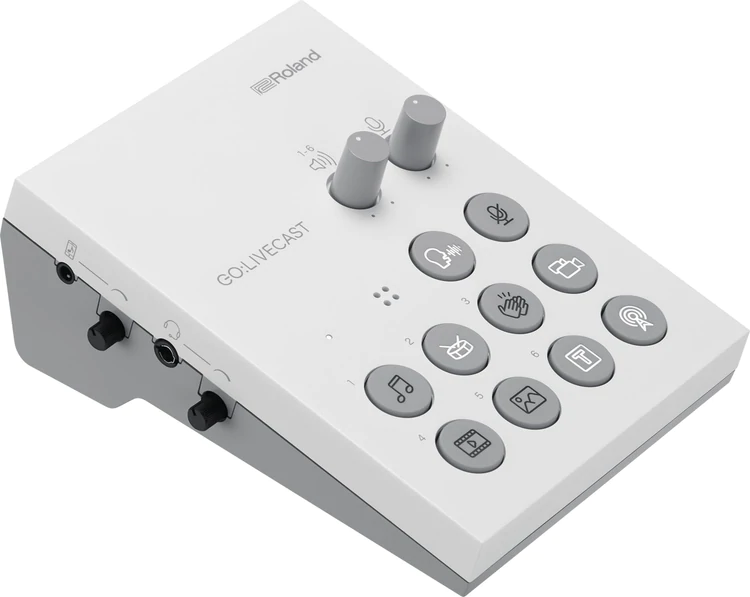
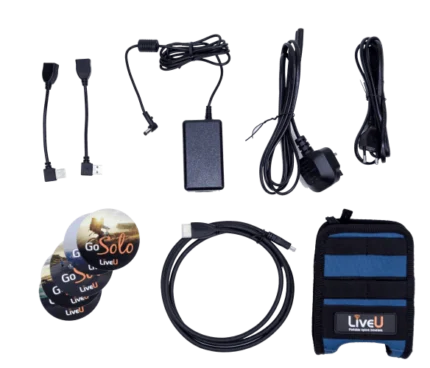
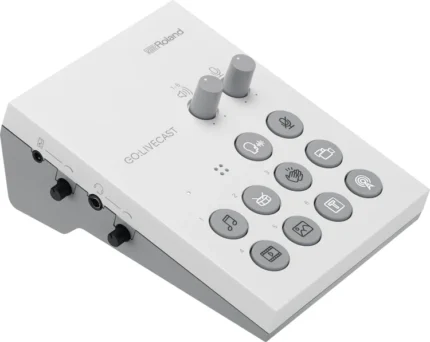
| Content | Easily create exciting webcasts from your smartphone or tablet with the Roland GO:LIVECAST, a complete live streaming production studio with a compact desktop interface and a flexible, interactive app. Its versatile I/O and tactile controls let you integrate multiple sound sources, control your device's camera, and trigger media files in no time.
With plug-and-play setup and intuitive icons labeling all ports and controls, the GO:LIVECAST is purpose built for user-friendly operations. Since it is compatible with popular streaming platforms and includes multiple cables for simple hookup to Lightning- or USB-equipped mobile devices, the GO:LIVECAST seamlessly fits in with your preferred workflow.
The companion app offers several features for enhancing the appearance of your webcast—a skin filter provides a softer look, in-camera mirroring delivers the correct left/right perspective to the viewer, automatic portrait/landscape switching. Incorporate a second smartphone camera via Wi-Fi to take advantage of split-screen views and one-touch camera switching for more complex video production techniques. Additionally, the app displays viewer comments in a scrolling window, so you can stay in tune with feedback from your audience.
Complete Miniature Webcasting Studio
Take control of your webcast's audio and video via the straightforward and customizable control layout. At your fingertips, clearly labeled buttons let you start your stream, show titles, and trigger various media files such as photos, videos, music, and sound effects in an instant.
Easy Setup and Operation
Forget about installing special drivers and fiddling with device settings; the GO:LIVECAST offers plug-and-play setup so you can get started right away. Simply connect your smartphone/tablet and a pair of headphones; you don't even need an external microphone because the GO:LIVECAST boasts a built-in mic, which also offers a reverb effect for added spaciousness. If your connected headset has an onboard mic, the GO:LIVECAST can utilize it instead.
Enhance Your Live Stream with Various Media
You don't need prior webcasting experience to use the GO:LIVECAST app's intuitive media tools and bring a competitive production quality to your content. There are preinstalled options for launching photos, videos, music, and sound effects, and you're free to build custom libraries at any time.
Push your productions further into the realm of professional with custom titles and text. To maximize efficiency and make your work easier, store media elements for different shows in Live Sets, which can be pulled up for easy access before you start streaming.
Supports Popular Streaming Platforms
The GO:LIVECAST app logs you into your accounts on popular streaming services such as Twitch, YouTube, and Facebook Live, enabling you to select a platform and press a button to begin your webcast. During your stream, a scrolling window in the app displays viewer comments.
Supports iOS and Android Platforms
The GO:LIVECAST is compatible with both iOS and Android devices, and includes Lighting and USB connectors.
Designed for Optimal Visuals
In the GO:LIVECAST's companion app, select your mobile device's front or rear camera and apply a skin filter for a softer, smoother appearance on camera. Your phone's position automatically determines portrait or landscape mode, and in-camera mirroring ensures that your audience will see you with the correct left/right perspective.
For more complex video production techniques, you can set up a second smartphone camera through Wi-Fi and either switch between the cameras or use them both in split-screen mode.
Versatile Connectivity
Since the XLR-1/4" combo input provides switchable 48V phantom power, you can use your preferred dynamic or condenser microphone. A dedicated 3.5mm stereo mini-jack input is provided to accommodate a line-level source such as a mixer, media player, synth, or drum machine. Use the 3.5mm stereo output to connect your favorite earbuds or headphones.
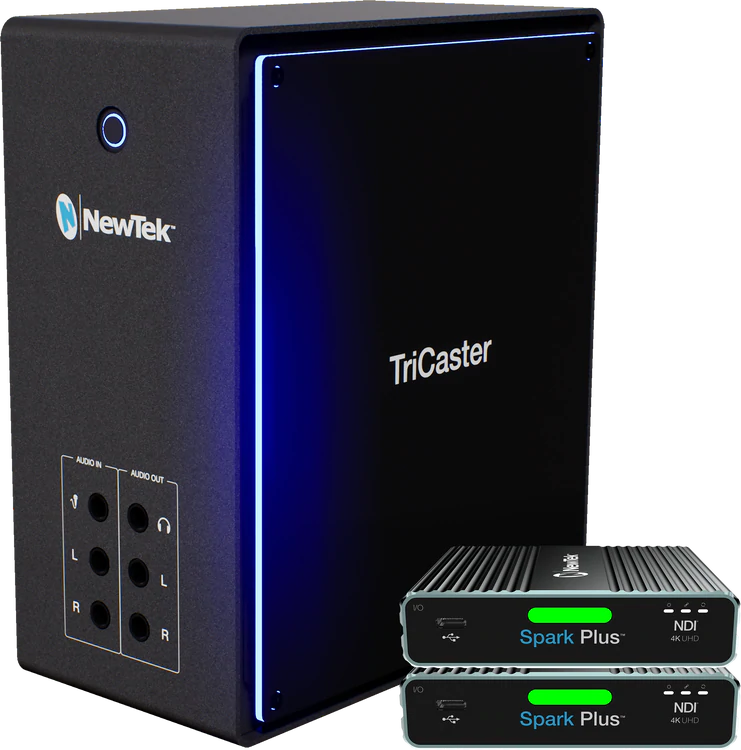
Via the GO:LIVECAST's four knobs, you're given effective control over the levels for the mic signal, line input, pad playback, and headphone output. Plus, there's a mic-mute button for times when you need to cut the mic feed if you need take a drink or cough. | NewTek TriCaster Mini 4K|NDI is an easy to use compact video creation system to let anyone with a story to tell make fun and exciting shows without needing production expertise.
You don’t have to be a video expert to tell your story with television-quality results. With TC Mini, you can be on your way to making a show in resolutions up to 4K UHD for delivery to any type of screen you want within minutes of opening the box. TC Mini takes portable live production to new heights with hundreds of amazing features, including virtual sets, social media publishing, multi-channel audio mixing, streaming, integrated media playback, and even live motion graphics and Live Story Creator MS Word® show automation with Premium Access. TC Mini delivers you all the benefits of IP based production using NDI® for easy connectivity to media components while leveraging simple one-to-one connections to your HDMI cameras and devices without cable length limitations.
No other portable video creation system offers so many easy and enjoyable ways to tell stories in such a small package for the price than TC Mini. The compact unit is easy to transport and set up with all the features you need to deliver high quality shows to screens and displays of any size or shape. With NDI®, TC Mini connects to a wide variety of NewTek and third-party systems over IP like cameras, converters, and custom software applications. Direct one-to-one connectivity with HDMI cameras and devices simplifies configurations and removes cable length limitations.
Key Features:
4K Ultra HD: Produce programs, performances, events and live sports in true 4K UHD (Ultra High Definition) resolution with support for native 2160p video at 60 frames per second.
Multi-Source Video Mixing: Viewers have their choice of devices. You should have options, too. With multiple source channels, including 4 external inputs, you can easily create compelling content using any combination of compatible video sources, including HDMI and NDI PTZ cameras, mobile devices, Skype TX video calls, computers, gaming systems, streaming media, video files, graphics, images, animations and more.
Built-In Video Servers: No recorders needed—just add your files with two built-in video players for on-demand and automated playback, including auto-advancing playlists, on-cue instant replay, live-edited highlight reels, and much more. With responsive player controls, presets, real-time editing tools, selectable transitions, and playlist effects, you have everything needed to make magic from your stored media.
Skype TX Software Integration: Conduct a live Skype video call with any remote guest, anywhere in the world. TriCaster TC Mini features Skype TX software support, including automatic Mix Minus for clean audio return to the caller. The studio-grade version of the popular app, Skype TX enhances the real-time interaction with broadcast-quality video and balanced audio, permitting you to present production-ready conversations, interviews, reports, and more—regardless of the caller’s device.
Recording: Capture up to 4 source channels of high-quality video as QuickTime® or NDI® files and record to storage. From archiving the master cut for your content library, to ingesting camera footage for post-production, to caching production extras and presentation materials for on-demand, TriCaster TC Mini easily handles the work of multiple professional recorders without the added expense. (10 source channels with Premium Access)
Replay: Insert instant replays from up to 4 NDI or converted HDMI input recordings with a single click instantly; or cue to play on demand instead. Replays include custom in/out transitions and speed control. Create basic highlight clips for instant playback and publishing with shortcut commands
Live Streaming: Stream live to your choice of new media platforms, including user-friendly presets for Facebook Live, Microsoft® Azure®, Periscope, Twitch, YouTube™ Live, and more. The integrated streaming encoder lets you easily deliver platform-specific content, while opening up new sponsorship and revenue opportunities.
Social Media Integration: Share real-time updates and on-demand content across your social media accounts, uploading images and video directly to Facebook, Imgur, LinkedIn, Twitter, Vimeo, YouTube and more—complete with comments and hashtags. Plus, with integrated DataLink™, you can add posts and photos from your social networks in on-screen graphics for a truly interactive experience.
Live Sound Experience: Set the tone for your production with comprehensive audio integration, including a software-based audio mixer, support for digital, analog and network audio, professional DSPs, fader control, VU metering, Talk Back communication, and stereo audio on master output.
Phenomenal Creative Elements: With TC Mini, you have the tools to turn every frame of video into an artistic masterpiece. Consider the screen a blank canvas and unleash your inner artist with multi-bus mix effects, data-driven graphics, custom animated transitions, a full-motion composition engine, and more. Let your imagination run wild.
Real Time Monitoring and Multiviewers: See everything happening during your production with fully adjustable single-screen or multi-screen monitoring. With up to three customizable multiviewers, configurable windows and workspace layouts, operator confidence monitors, visual indicators, and more, you can easily personalize the TC Mini environment to your preference.
Studio Grade Video Tools: Perfect your programs with configurable color correction tools, object positioning, and smooth-edge cropping. Apply picture-in-picture effects with optional borders. Build composite scenes from different foreground and background elements. And so much more.
Spectular Live Chromakeying: Think outside the box with real-time keying so crisp and clean, your viewers will never believe it’s green screen. With NewTek’s powerful LiveMatte™ technology built into every source channel and M/E, you have 10 fully configurable keyers to create composite scenes from live video, graphics and virtual sets for reports, presentations, demonstrations, and more.
World Class Live Virtual Sets: Save on studio and set expenses without sacrificing production value. With integrated LiveSet™ technology and more than 30 included set designs, TC Mini can transport your talent into professionally-designed virtual environments, complete with multiple angles, virtual camera movements, real-time reflections, specular highlights, animated lens flares and stunning augmented reality effects that blur the line between virtual and reality.
Interconnected Workflows: You don’t work in a silo. Neither should your equipment. With native integration of innovative Network Device Interface technology, TC Mini connects to the most prolific IP-based workflow in the industry right out of the box, networking seamlessly with compatible products from hundreds of manufacturers and developers. | NewTek IP Series 4-Stripe Control Panel
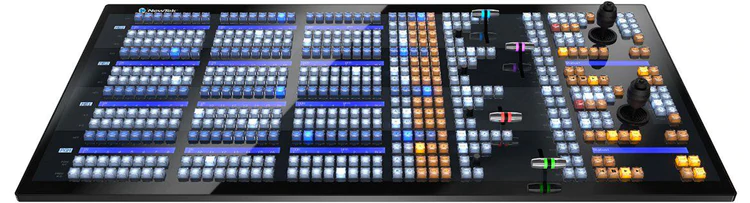
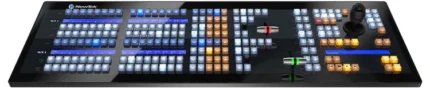
Definitive control for the most demanding IP production ecosystems.
The pinnacle of control for large-scale interconnected production environments, the NewTek IP Series 4-Stripe Control Panel lets you command multi-source, multi-system, and multi-site productions with absolute confidence.
Surface ~ 42.4 x 21.26 x 6.13 in (107.7 x 54.0 x 15.6 cm)
Features
-
- Intuitive layout mapped to the NewTek IP Series Video Mix Engine user interface
-
- IP-based connectivity, with support for multi-engine control over the network
-
- Responsive, multi-bus operation with independently assignable control stripes
-
- Practical lighting, variable T-Bar illumination, and dynamic LCD label displays
-
- Precision controls for expert handling of real-time video operations
-
- Premium craftsmanship for optimal performance, ergonomics, and style
NewTek IP Series 4-Stripe Control Panel is also compatible with TriCaster TC1. | PORTABLE COMPACT HD SWITCHER
So compact and portable, you can bring the V-1HD and use it anywhere!
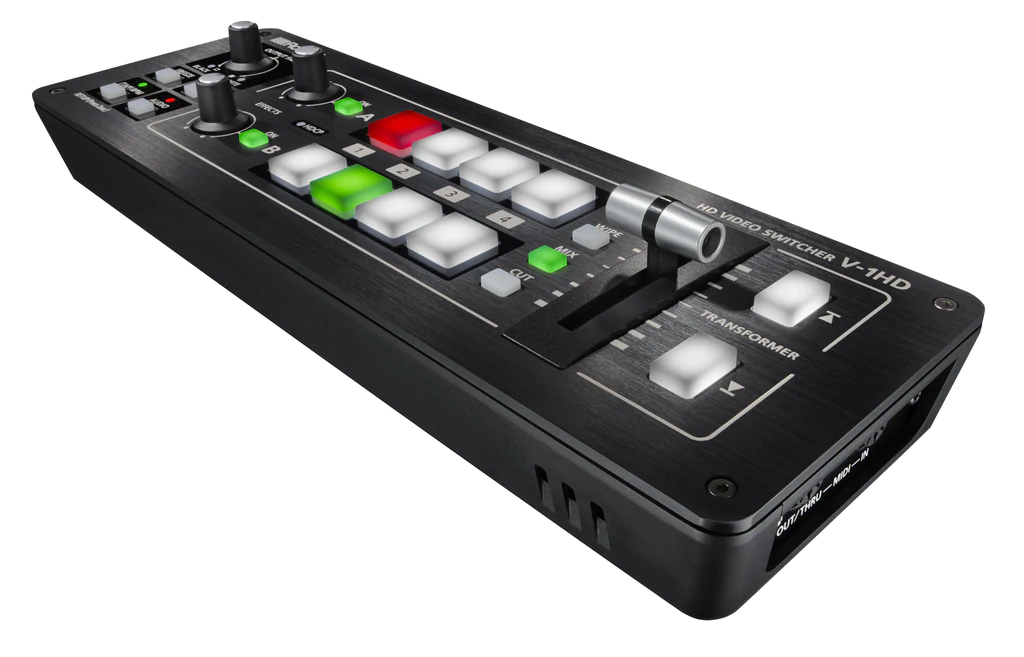
The V-1HD is a compact and portable four channel video switcher with both hardware and connected PC / iPad control that supports four HDMI inputs at resolutions of up to 1080p along with a 12 channel audio mixer with audio embedding and de-embedding from HDMI. The V-1HD supports professional compositing effects such as picture-in-picture and keying allowing for graphic insets, titling or even “green screen” and is ideal for news broadcast or corporate training productions. For creative live event video switching, the V-1HD includes a advanced video effects for transforming video into creative visuals to support all kinds of performances.
Features:
- Support for video cameras, action cameras, smart phones, tablet computers and other HDMI devices
- 4 HDMI inputs
- Supports up to Full HD 1080p
- Easy to Use Interface
- Picture-in-picture and split functions
- Two EFFECTS knobs deliver genuine visual performance
- Full 12 Channel Audio Mixer Included
- Easy to Operate with Hardware Controls
- Two HDMI Outputs
- Remote Control via USB or MIDI Connection
Feature packed and easy to use for high-quality HD video results.
For creative live event video switching, the V-1HD includes a advanced video effects for transforming video into creative visuals to support all kinds of performances. Output of your video mix is as simple as connecting the HDMI output to a projector or screen at an event and you can even connect a recorder for capturing your event or production.
4 HDMI Inputs
The V-1HD has 4 HDMI input connectors compatible with a variety of equipment. The V-1HD supports 1080p/1080i/720p video resolutions. Devices outputting the same resolution can be input regardless of what type of device they are. Both progressive and interlace signals can be input allowing for both 1080i and 1080p signals to be used at the same time. Video signals input from a PC are accurately displayed thanks to progressive signal processing. HDCP is supported for input of copy protected content from devices such as Blu-ray disc players.
Professional Switching
The V-1HD has large back-lit buttons for intuitive video switching even in low light conditions. Red lit buttons indicate the current source being output and green lit buttons indicate the video that will be output on the next transition. The V-1HD even lets you know which inputs have sources connected by illuminating the buttons of the inputs with connected sources. The V-1HD features broadcast style Preview/Program switching for professional results. The TRANSFORMER buttons can be used for instantly switching the video or applying effects. Three transition selection buttons permit quick change of mixing style to match style changes in a performance or broadcast. Transition effects include CUT, MIX (4 types) and WIPE (30 types). The auto scan function switches the video automatically across the four video inputs. By using the T-Fader and BPM SYNC button, you can deliver visuals synced to a music performance. Use the FREEZE button to temporarily pause the incoming video. The output fade function makes the output video fade to black or white.
Effects
Compositing Effects. Compositing two videos in one screen using Picture in Picture or the split function is ideal for seminars and presentations. The V-1HD also supports chroma key and luminance key which ideal for creating professional looking broadcasts using green screen backgrounds or for overlaying computer generated titles on top of video sources. Many of the visual performance functions made popular by the V-4EX and V-8 are included. Use the knob A and knob B to apply and adjust effects to the A bus and B bus respectively. Nine types of filter effects including silhouette, colorpass, negative and findedge are possible. Effects can also be triggered using the TRANSFORMER buttons for even more interactive visual performance possibilities.
Audio Mixing
Included is a 12 channel digital audio mixer. The V-1HD can mix 4 stereo audio inputs from the HDMI ports, the stereo line level input and a mic level input. Every channel is equipped with a delay function* to synchronize the video and the audio. Audio follow function enables the audio to transition along with the video. Reverb function and mastering function used for adjusting sound quality and volume are also supported. The final audio mix is both embedded in the HDMI output along with the video signal and is also output to the stereo audio output jacks for sending the audio mix to a PA system or recording it on an external device. *The maximum delay time is 500ms.
Menu and Settings
The on-screen menu display appears on the preview screen and is easy to operate with hardware controls. Making adjustments to parameters and operating the audio mixer can be made by simple operation of the buttons and the T-Fader on the unit.
Preview Output
The four-way multi-view preview screen shows all four input sources on a single display for confident moniotoring. A red border shows the video currently being output and a green one indicates the video to be output next. There are three types of view modes available for the preview output which are Multi-view, Output (as a secondary program output) and Preview. The on-screen display can be turned on or off.
Remote Control via USB or MIDI Connection
Remote control is possible with the dedicated V-1HD RCS application on a PC, Mac or an iPad connected via a USB cable. The application offers a detailed view of the connected V-1HD and can be used to switch video, mix audio or change settings. You can control the unit from a music instrument or a sequencer via the MIDI input connector via MIDI. The V-1HD also transmits MIDI over USB and its controls can be mapped to popular visual performance software applications. *For more information on the dedicated application, see the Roland website. * Please use the iPad camera connection kit to connect an iPad to the V-1HD.
Easy to Operate with Hardware Controls
Basic operations can be done by operating the buttons and the T-Fader on the unit. To make detailed settings you just need to connect a monitor to the preview connector.
| VIDEO |
|
| Video Processing |
4:2:2(Y/Pb/Pr), 8-bit |
| Output Connectors |
HDMI OUTPUT: Type A(19pins) / HDMI PREVIEW: Type A(19pins) *HDCP Supported |
| Input Formats |
HDMI: 720/59.94p,720/50p(FORMAT switch = 720p) HDMI: 1080/59.94i,1080/50i,1080/59.94p, 1080/50p(FORMAT switch = 1080i or 1080p) *The input interlaced video signal is converted to progressive video signal by internal processing. *The video signal frame rate is selected by SETUP parameters (59.94 or 50). |
| Output Formats |
HDMI: 720/59.94p,720/50p(FORMAT switch = 720p) HDMI: 1080/59.94i,1080/50i(FORMAT switch = 1080i) HDMI: 1080/59.94p,1080/50p(FORMAT switch = 1080p) *The video signal frame rate is selected by SETUP parameters (59.94 or 50). |
| Video Effects |
Transition: CUT, MIX (DISSOLVE/FAM/NAM/MOSAIC), WIPE (30 types), TRANSFORMER(11 types) EFFECTS: NEGATIVE, EMBOSS, COLORIZE, COLORPASS, POSTERIZE, SILHOUETTE, MONOCOLOR, FINDEDGE, FLIP, WH-LUMIKEY@, BK-LUMIKEY@, GR-CHROMAKEY@, BL-CHROMAKEY@, PinP(1/4)@, PinP(1/2)@, SPLIT(H-STRETCH)@. SPLIT(H-CENTER)@, SPLIT(V-STRETCH)@, SPLIT(V-CENTER)@ *@ marked Effects are effected common to A-BUS and B-BUS. |
| AUDIO |
|
| Audio Processing |
Sampling rate: 24bit/48kHz |
| Input Connectors |
Digital: HDMI OUTPUT (HDMI Type A 19 pins), HDMI PREVIEW (HDMI Type A 19 pins) Analog: AUDIO OUT (RCA pin type), PHONES (Stereo mini type) |
| Input Level |
AUDIO IN: -10 dBu (Maximum : +8 dBu), MIC: -41 – -13dBu (Maximum : -1 dBu) |
| Input Impedance |
AUDIO IN: 15 k ohms, MIC:10 k ohms |
| Output Level |
| Output Impedance |
AUDIO OUT: 1k ohms, PHONES: 10 ohms |
| Audio Effects |
EQ, Delay, Compressor, HPF, Gate, Reverb, Mastering effect |
| OTHERS |
|
| Other Connectors |
USB: B Type (for remote control from PC), MIDI: IN, OUT/THRU |
| Other Functions |
MEMORY (8 types), FREEZE (input video captured),
BPM SYNC (auto transition synchronized to tempo), OUTPUT FADE (WHITE/BLACK) |
| Power Supply |
AC adaptor |
| Current Draw |
1.5A |
| Power Consumption |
18W |
| Dimensions |
313 (W) x 102 (D) x 59 (H) mm / 12-1/3 (W) x 4 (D) x 2-1/3 (H) inches |
| Weight |
1.2 kg (excluding AC adaptor) 2 lbs 10-2/5 oz |
| Accessories |
Owner’s Manual, AC Adaptor, Power Cord, Cord Hook |
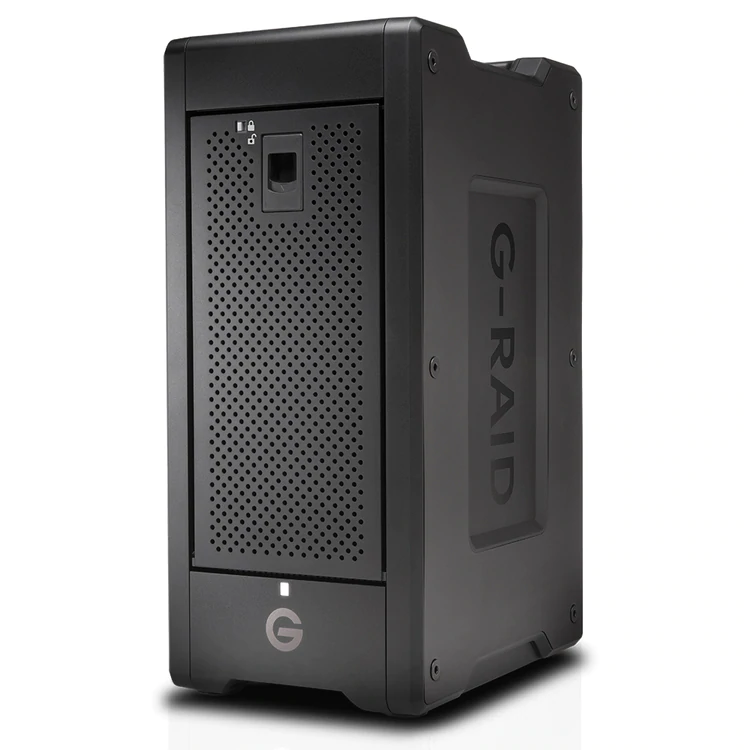
| Transportable, hardware RAID, 8-Bay Thunderbolt™3 Storage Solution
A transportable 8-bay hardware RAID solution with Thunderbolt™3 technology offering content creators colossal capacity and high-powered performance. Supports multi-stream 4K, 8K and VR workflows, RAID 0, 1, 5, 6, 10 and 50 configurations, and provides transfer rates up to 2000MB/s. Along with Enterprise-class hard drives for enhanced reliability and a trusted 5-year limited warranty, the G-RAID Shuttle with Thunderbolt 3 is the ultimate storage solution for demanding video workflows on location and in the studio.
- Up To 144TB Of Storage
- Hardware RAID
- Fast, Enterprise-Class 7200RPM Hard Drives
- Transportable Design
- Transfer Rates Up To 2000MB/s
- Daisy-Chaining For 5 Additional Devices
- Dual Thunderbolt 3 Ports
- 5-Year Limited Warranty: G-RAID Shuttle with Thunderbolt 3 is backed by a standard 5-Year limited warranty and unlimited free technical support by representatives experienced with the latest content creation applications.
Full Specifications
Compatibility
macOS 10.12+
Windows 10, 7 (via reformat)
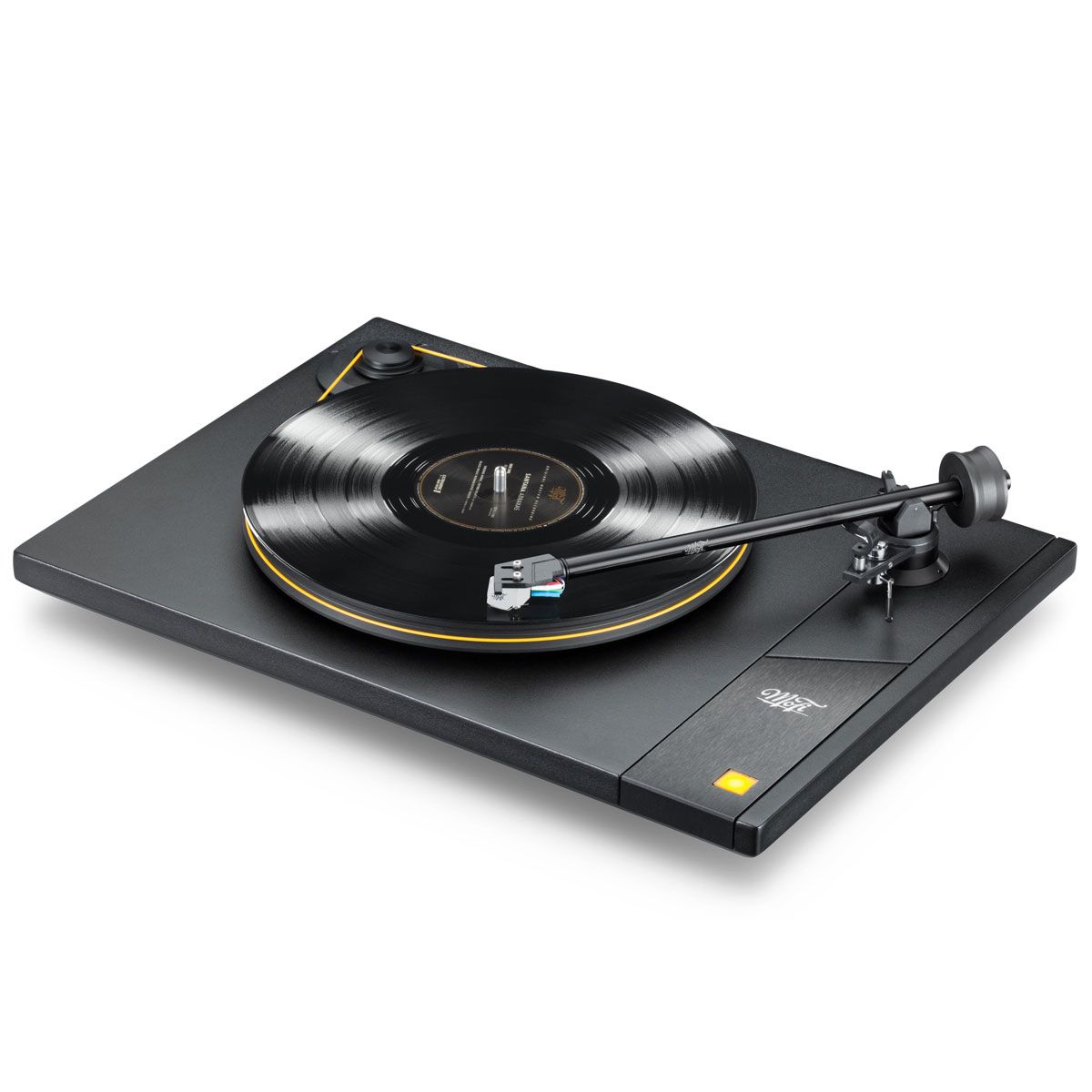
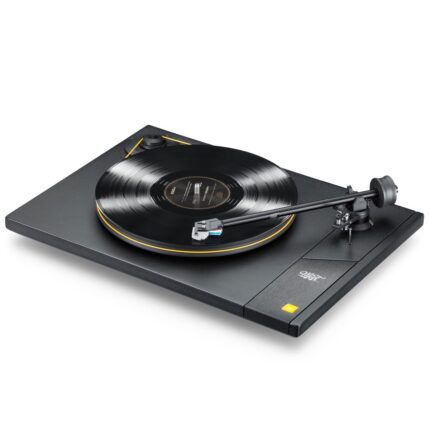
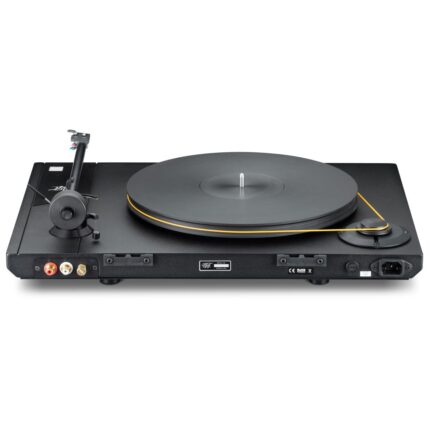
| The StudioDeck Foundation is all about getting to the core or – Foundation of what makes MoFi Electronics’ award-winning turntables so extraordinary. They've stayed true to why are turntables are some of the best in the game while creating a new entry point to the world of MoFi Electronics.
STUDIO TONEARM: Custom-developed and manufactured in the USA, this 10-inch straight aluminum gimbaled bearing tonearm delivers the ideal balance of rigidity and low tracking error, so all you hear is what is in the grooves. Tweak to your heart's delight with provisions for adjustable tracking force, VTA, azimuth, and anti-skate.
ISOLATED AC SYNCHRONOUS MOTOR: MoFi's 300 RPM stepped-pulley AC motor provides excellent speed stability for pitch accuracy and rhythmic drive. The Delrin pulley has two positions for 33 1/3 and 45 RPM speed selection. Motor vibrations are kept away from the platter and stylus by using advanced dampening materials that decouple the motor from the rest of the turntable.
CONSTRAINED LAYER DAMPENING: StudioDeck features an aluminum plate carefully bonded to an MDF body to add mass and eliminate tonal coloration, maintaining the true sound found on the record.
METICULOUS DESIGN AND EVALUATION: Advanced technology, user-friendly features, and unflappable design elements ensure phenomenal playback-ultimately bringing the sound of Mobile Fidelity's famous studio into your home.
3/4-INCH DELRIN PLATTER: Delrin is a next-generation polymer developed by Dupont. In the world of audio, Delrin's highly crystalline structure presents a wonderful impedance match to vinyl records, effectively grounding unwanted noise and keeping it away from the stylus.
STEEL AND TEFLON INVERTED BEARING: MoFi's steel inverted bearing system is designed for smooth, quiet rotational stability. The extremely low tolerance combination of steel, bronze, and teflon-found in much more expensive turntables-will provide you many years of high-performance playback. |





Reviews
There are no reviews yet.